|
 |
|
PRODUCTS
|
 |
 |
|
THE DETAILS
|
 |
 |
|
PRESENTER RESOURCES
|
|
|
|
 |
Inserting a new slide into PowerPoint |
|
 |
We don’t just sell PowerPoint templates.
We focus on supporting our products and providing you with additional information to make your PowerPoint presentations more successful and easier. This is one in a series of tips to make using PowerPoint more efficient...whether you choose our templates or others.
|
|
|
 |
|
|
How to insert a new slide into your PowerPoint presentation |
 |
 |
 |
|
If you're going to use PowerPoint regularly, it will speed your workflow to learn the various shortcuts available. You've opened a
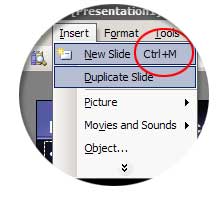
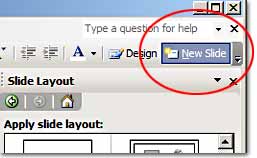
presentation and selected a slide design from your available PowerPoint templates. Now, how many ways can you add a new slide?
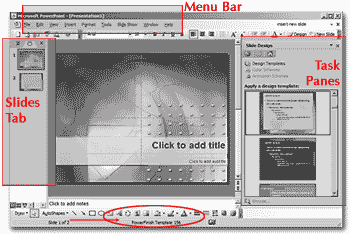
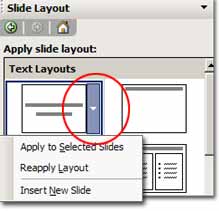
If you haven't explored the options available in PowerPoint 2003, you might be surprised to learn that there are at least seven options (maybe more) available in PowerPoint. These options are
available from the menu bar, the slides tab and the task pane. See the image to the right to see these sections of the PowerPoint workspace.
|
|
What’s Your PowerPoint Working Style? Some presenters like to use menus, others use keyboard shortcuts. Whatever your working style, PowerPoint is set up to efficiently allow you to complete common tasks easily.
|
|
|
|
|
 |
|
Tip: If you forget the name of the template you’re using, just look at the bottom of your screen.
(See the circled area in the image above.)
|
|
|
|
 |
|
|
|
 |
 |
 |
 |
 |
|
 |
|
|
|
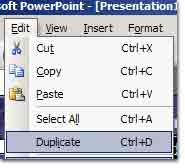
By the way, Edit/Duplicate will do the same when you select a slide thumbnail from the Slides Tab. |
|
|
|
 |
|
 |
Keyboard Options |
 |
Just Hit Enter.
Another convenient option is to use the Enter key on your keyboard. Just click in the left panel (Slides Tab) and hit Enter. I like this choice because it’s fast - no menus, no
confirmation...just a new slide. I also like the fact that by placing your cursor between slides, you can choose a specific location where the new slide will be placed. If you just click in a blank space
in this panel, you'll see a blinking line that indicates where the new slide will be placed when you hit enter. If you click between two thumbnails, the new slide will be placed there. If you highlight a specific slide thumbnail (a box will appear around it) and use the Enter key, the new slide will appear following that one. See the images below for selected slide or location indicator.
|
 |
Right Click Options |
 |
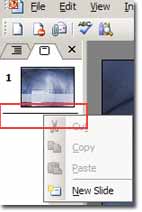
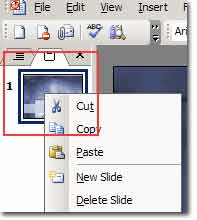
Right clicking on any item is always a good way to explore your choices.
|
 |
 |
|
These examples were all created using PowerPoint templates from PowerFinish.
|
 |
 |
|
Microsoft and PowerPoint are either registered trademarks or trademarks of Microsoft Corp. |
 |
 |
|
Studio F Productions, Inc. Sarasota, FL 34242 941-312-9609
|
|