Try a free sample of our new Video Backgrounds for PowerPoint. Download the video, unzip the file, and insert the wmv file into PowerPoint. If you wish, you can open it in Movie Maker or iMovie and add a title before placing it in your presentation. See Video Background FAQs for more information about how to use Video Backgrounds in PowerPoint.
This free sample will also let you determine if your computer is up to
date with the hardware and software needed to play videos in PowerPoint.
Sign Up for Special Offers from PowerFinish
Members get occasional free samples, tips and tutorials about PowerPoint, notice about new PowerFinish templates and special offers to
make your presentations more professional. We won’t overload your mailbox and you will always be able to opt-out at any time. Your e-mail will never be shared.
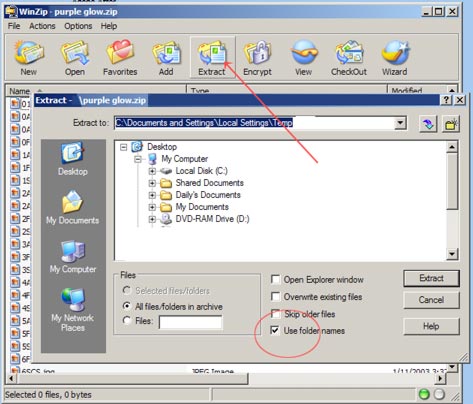
To extract the download, you will need WinZip, PKZip or some other unzip program.
Most computers have one of these utilities installed. (If you do not have one, you can do a search on “unzip utility” and find many free or inexpensive programs available.
You may unzip to any convenient
location on your computer. Then just access from within PowerPoint. When you extract/unzip the download, make certain that “use folder names” is checked (as shown to the left). This will make it easier for you to locate the templates and alternate backgrounds.
The files will unzip to a folder with the same name as the sample download to the location you choose.
The Template Design Set download has a help files.
Just double click on the starthere.html to open the readme/help file if you need assistance using the sample.
Microsoft and PowerPoint are either registered trademarks or trademarks of Microsoft Corp.